
In this sectionFiles and delivery5 articles
Which files you can sell
The file types Koarge accepts, the size and storage limits, and what happens when an upload is refused.
Which files are accepted
Koarge accepts the file types below. Anything else is refused — renaming a file won't get around it.
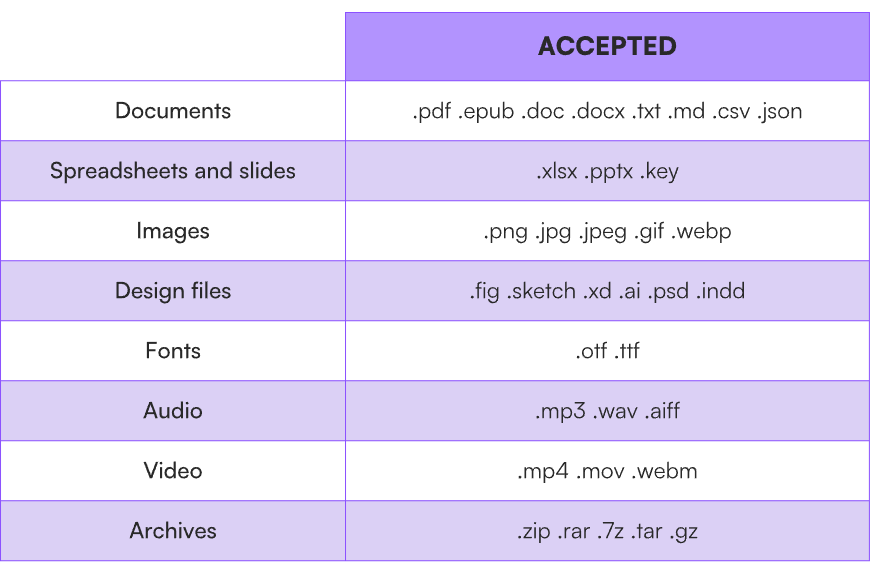
The same list appears under the upload box when you're attaching a file to an offer.
What's blocked
Anything that runs on your buyer's machine:
.exe .bat .cmd .com .msi .msp .scr .dll .sys .ps1 .vbs .vbe .js .jse .wsf .wsh .sh .bash .zsh .apk .ipa .dmg .pkg .app .jar .php .asp .aspx .cgi .pl .py .rb
This isn't about doubting you. A payments platform that delivers executables becomes a malware distribution channel quickly, and every seller on it inherits the reputation damage.
Archives are opened and checked. A ZIP containing a blocked file type is rejected, even though ZIP itself is accepted.
Size and storage
150 MB per file. A platform ceiling, the same on every plan — it can't be raised by upgrading.
1 GB per account, across everything you've uploaded.
What counts against your allowance:
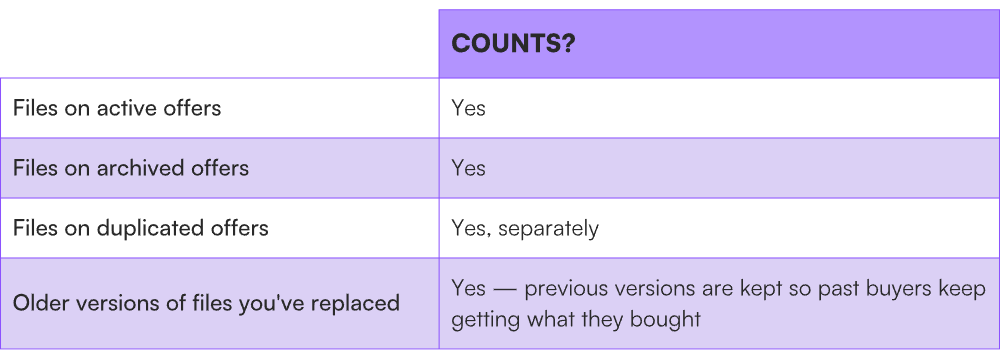
Archiving an offer doesn't free storage, and a file can't be removed from a digital offer on its own — a digital offer has to have one. If you're near your limit, contact support.
If your file is over 150 MB
-
Compress it. Video and audio are usually far larger than the delivery quality buyers expect.
-
Split it into parts and sell them as separate offers.
-
Trim the bundle. A ZIP with every source file, every export, and every variant is heavier than what buyers actually want.
Every file is scanned
Uploads are scanned for malicious content before they can be sold. Small files clear almost immediately; large files and archives take longer.
ZIPs are unpacked and their contents scanned rather than treated as a single blob — otherwise the check would be trivial to bypass. Unpacking has limits on nesting depth, file count, and total unpacked size, so a deeply nested or enormous archive can fail to scan and be rejected.
The scan checks for malicious content only. It doesn't assess quality, check copyright, or review what you're selling. Nobody at Koarge reads your files.
Encrypted and password-protected files
Rejected. A file that can't be opened can't be scanned, and delivering something unexamined isn't something Koarge will do.
You don't need your own encryption anyway. Files are stored privately and delivered over expiring links unique to each buyer.
One file per offer
An offer delivers one file. To sell a bundle, put everything in a single ZIP with a sensible folder structure and a README.
If it doesn't work
-
Your file type was refused. Check it against the accepted list above. Anything not listed is blocked.
-
Your ZIP was refused. Either it contains a blocked file type, or the scan found something. Old build artefacts and bundled third-party tools are common causes — rebuild the archive from a clean folder with only what buyers should receive.
-
The scan keeps timing out. Flatten the archive: fewer nested folders, fewer files inside files.
-
The upload fails partway. Check the file is under 150 MB, then retry on a stable connection.
-
You're out of storage. Archived and duplicated files both count, as do older versions of replaced files. Contact support.
-
You've ruled everything out. Contact support with the file name, size, and type. Don't rename and retry — the scan reads contents, not names.