
In this sectionFramer plugin5 articles
Style your checkout drawer
Making the checkout drawer look like the rest of your site — colours, fonts, and the thank-you message your buyer sees.
Where this lives
The Checkout tab in the Koarge plugin panel, inside Framer. This is plugin-only; there's no equivalent screen in your seller dashboard.
Your theme applies to every offer on your account. You style checkout once, not per product.
Republish to see your changes
Saving a theme doesn't update your live site on its own. Publish your Framer site after saving, or your buyers keep seeing the old drawer.
This is different from offers, where a price or file change takes effect on your live site straight away.
Preview as you go
The Checkout tab shows a live preview of the drawer with your colours applied, using one of your real offers. View full preview opens it at proper size, which is worth doing before you save — the panel is narrow, and colours read differently at full width.
Light mode is all you set
You set colours for light mode only. On a dark site, the drawer adapts on its own to keep text readable against a dark background.
Background
Set the drawer background as a solid colour or a gradient.
Colours
Five colours, each covering a specific set of elements:
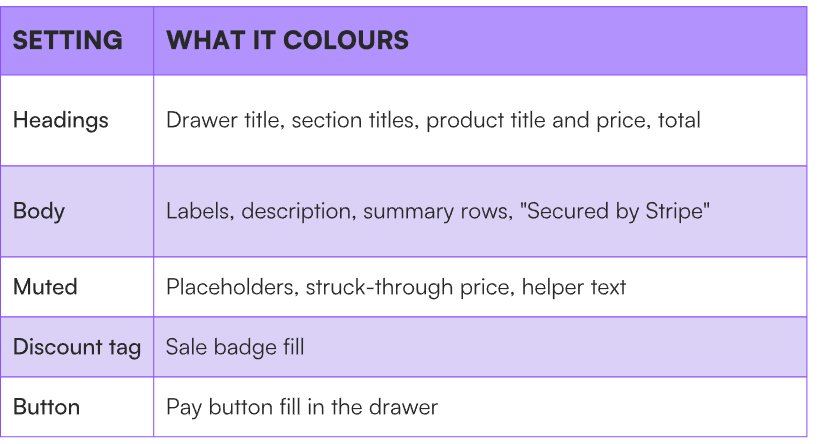
Two of these only appear on some offers. The discount tag and the struck-through price covered by muted both need a compare-at price set on the offer — without one, there's no sale badge and no struck-through price to style.
Typography
Two fields: heading font and body font.
Type any Google Font name — Poppins, Playfair Display, whatever your site already uses — and it loads automatically. Leave a field empty for the defaults: Raleway for headings, Inter for body. The body font applies to labels, descriptions, and placeholder text.
Matching your site's fonts here is the single change that does most to make checkout feel like part of your page.
Thank you page
Edit the heading and message your buyers see after paying. The order details and receipt text below them stay the same.
The defaults are "Thank you!" and "Your payment was successful. We've saved your order details below."
Contact the seller
Buyers can reach you from the thank you page. Add a contact link and they'll go to your contact page.
Leave it empty and the link opens an email to you instead. The plugin shows which address that will be, directly under the field. It's your account email by default — change it under Setup → Emails in your dashboard if you'd rather replies went somewhere else.
Save your theme
Select Save theme, then publish your Framer site.
If it doesn't work
-
Your live site still shows the old drawer. You've saved but not republished. Publish your Framer site.
-
Your font isn't loading. Check the spelling against the name on Google Fonts exactly, including spaces. A name that doesn't match falls back to the default.
-
The discount tag colour does nothing. The sale badge only shows on offers with a compare-at price set.