
In this sectionReceipts and emails5 articles
Which emails Koarge sends
Every email Koarge sends, who receives it, and what triggers it.
Two separate streams
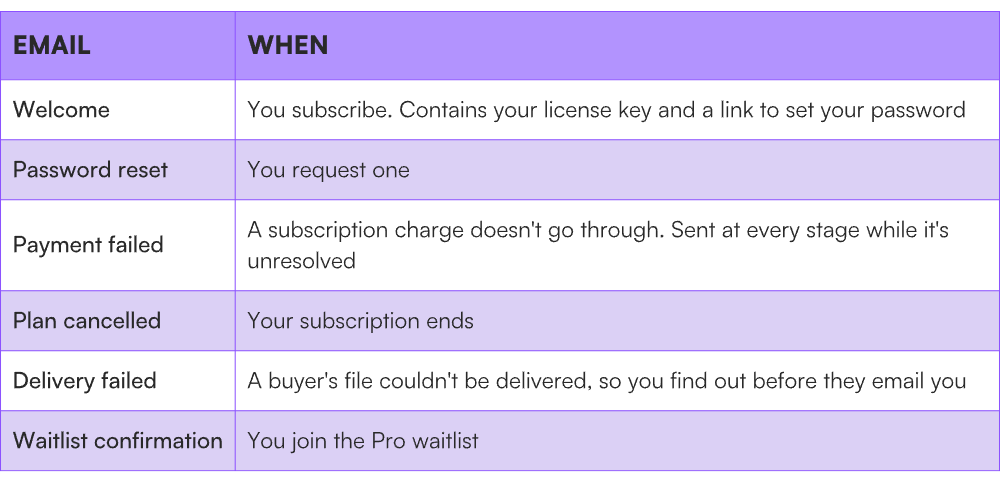
Emails to you come from Koarge, about your account. They always come from a Koarge address and you can't change that.
Emails to your buyers are sent on your behalf, about their purchase. These carry your business name and, once you've verified a domain, your own address.
Emails you receive
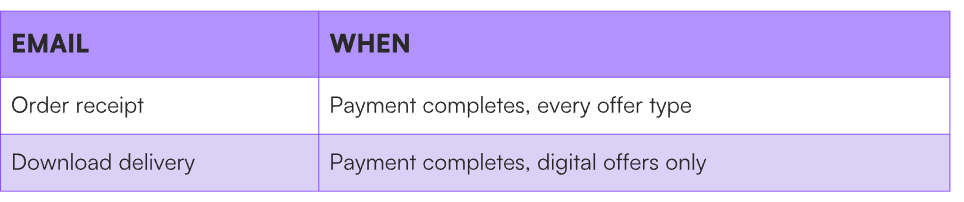
Emails your buyers receive
That's the whole set. Koarge doesn't send your buyers marketing, follow-ups, review requests, or abandoned-checkout reminders. If you want any of that, it's yours to send.
The receipt confirms what they bought, what they paid, and when — a record they can keep or forward to an accountant.
The delivery email contains the download link for their file. Your buyer also gets that link in the drawer immediately after paying, so the email is the copy they still have once the tab is closed.
Why two messages and not one. Receipts get filed away unread. The delivery email is the one your buyer needs to act on, and burying a download link inside a financial document is how buyers end up emailing you.
Who they appear to come from
Until you verify your own sending domain, buyer emails are sent from a Koarge address with your business name attached. Buyers see your name, but the underlying address isn't yours.
Once you verify a domain, they come from your own address — better for recognition and for deliverability. See Send emails from your own domain.
You can also set the sender name, a support address, and a reply-to address. See Brand your emails.
What buyers can't do
Buyers don't have accounts. They can't log in, view an order history, or re-download after their link expires without asking you. Everything after purchase runs through you.
Because there's no buyer account, your product page is the only place to say how long access lasts and what to do if the email doesn't arrive. Sellers who state it get noticeably fewer support emails.
If your buyer gets two receipts
Koarge sends your buyer a receipt. If Stripe is also set to email receipts, they get two messages for one purchase — one branded as yours, one from Stripe. It looks careless, and it makes buyers think they were charged twice.
The setting lives on your Stripe account, so it's a one-time change you make there:
-
Open your Stripe dashboard.
-
Go to your email settings under customer emails.
-
Turn off Successful payments.
-
If you see an option for invoice or subscription emails, turn that off too.
Keep Koarge's. It carries your business name, matches the delivery email, and shows the offer name your buyer recognises.
If you ever connect a different Stripe account, check this again — it's per-account, and a new account arrives with Stripe's default behaviour.
If it doesn't work
-
A buyer got no delivery email. Either it's a service offer, which has no file, or the delivery failed. See A buyer can't get their file.
-
Still two receipts after switching it off. Check you changed it on the account connected to Koarge, and in live mode rather than test.
-
You're not getting account emails. Check spam and confirm your address under Settings.
-
A buyer replied and you never saw it. Check your reply-to address under Setup → Emails.